The iMac Pro was an awesome computer when it was released in 2017. I bought the model with the 10 core Xeon as it seemed the best balance available between single threaded and multi-threaded performance. I also got 64GB of RAM. I bought this before I actually started doing any astrophotography but it served me well once I started that adventure and it has been a good partner with PixInsight. So much so, that I’ve been content to wait to upgrade until PixInsight natively supported Apple silicon.
However, at seven years old, the system is starting to show its age. My plan had been to buy the M3 Mac Studio as a replacement this year. Except that Apple did not release a new Mac Studio and based on the reports of the M3 chip performance relative to the M2 and the expected improvements in M4, I decided it was worth waiting until 2025 for that. However, I did pick up an M3 MacBook Air.
This really wasn’t intended for PixInsight. But, having spent a good chunk of my professional career focused on software performance, I began to wonder how the two system would compare. After all, if I was at a star party, I could do some preliminary processing just to see how the project was progressing and it seemed like an interesting, if somewhat ridiculous project. Nobody is going to move from a 10 core, 64GB system to an 8 core 16GB system for PixInsight.
But, on paper, the comparison wasn’t as one-sided as it might look. Compared to conventional productivity software, PixInsight really demands a lot from a computer. It has processes that need fast single threaded performance. It has processes that need fast multi threaded performance. It has processes that can consume as much memory as possible. It needs fast disk I/O. And, with third party tools, fast GPU’s are also important.
So….how does a high end system from 2017 compare to a relatively low end system from today?
Looking at native CPU performance, the MacBook Air actually has the advantage. In the Geekbench 6 benchmark, the iMac Pro has a single threaded result of 1,325 while the MacBook Air with the M3 turns in a much higher number of 2,999. In pure single threaded computational performance the MacBook Air should outpace the older Xeon quite a bit.
For multithreaded it is 8,088 for the iMac Pro vs 11.869 for the MacBook Air. The difference is not as dramatic but the newer system should still win.
The question is how Rosetta2 overhead will hurt the MacBook Air. Since PixInsight is compiled for Intel, the Rosetta2 translation subsystem must translate the Intel instructions to native Mac silicon instructions. Exactly how much this will cost remains to be seen.
For GPU performance the situation reverses with the Radeon Vega 64 outpacing the 10 core M3 GPU with an OpenCL Geekbench 6 result of 53,580 on the iMac Pro vs 30,155 on the MacBook Air. The Metal number are higher in both cases but proportionally so. This won’t have an impact on standard PixInsight processes but for tools in the Terminator family or other third party processes that use the GPU then one would expect the older system to perform better.
The iMac Pro has a 1TB internal SSD and the MacBook Air has a 512GB internal SSD. However, in both cases I’m using an external Thunderbolt SSD as the work disk. The raw data comes from a network share on a QNAP NAS. The iMac Pro reaches that share via 10 gigabit per second ethernet and the MacBook Air via WiFi 6. The QNAP NAS also is connected via 10 gigabit per second ethernet. For swap disk, each system has a directory on the internal and external SSD’s. This maximized the results of the PixInsight Benchmark script
And, speaking of the PixInsight Benchmark, the iMac Pro produced 17,200 cpu and 18,900 swap for a total of 17,400 while the MacBook Air produced a total of 10,800 cpu, 17,200 swap and a total of 11,600. The lower CPU score on the MacBook Air probably is attributable to Rosetta2. I say “probably” since I don’t really know what the benchmark is doing and how much of an impact the lower memory on the MacBook Air has on the benchmark score.
Unlike Geekbench, the PixInsight benchmark exhibited a bit more variability from run to run so these are averages of 5 consecutive runs. The swap values, in particular were quite variable. I’ve not been able to determine the cause for that. It could be any number of things and whether it’s being caused at the application, operating system or hardware level was beyond my ability to analyze quickly.
With all that out of the way, how did they compare. For the test, I ran WBPP with a set of data taken at home with the ASI6200MM Pro camera. These are large files. Each file, saved by NINA in compressed XISF format is 77MB. There were three nights of data. Each night had its own flats and there were master darks for the entire data set. WBPP did calibration, cosmetic correction, measurement, bad frame rejection, registration, local normalization, integration and 1x drizzle integration.
This took one hour, 55 minutes and 39 seconds on the iMac Pro and kept the fans on the system active for a large chunk of that time. The fans on the iMac Pro are not obnoxiously loud but definitely noticeable when they get much over idle and at full speed put a fair amount of noise (and heat!) Into the room.
The MacBook Air took 3 hours, 34 minutes and 24 seconds.
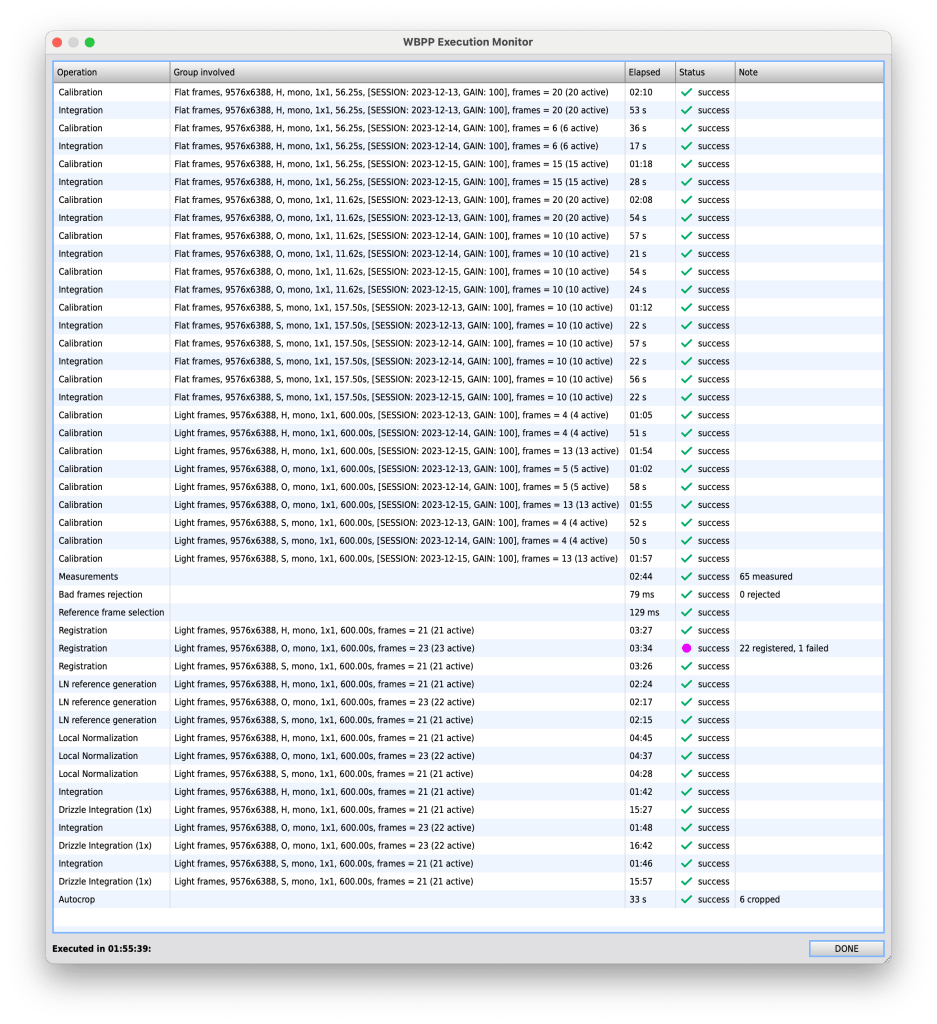


That doesn’t tell the whole story, however. Let’s look at some of the individual processes:
Calibration of 15 flat frames took 2:10 on the iMac Pro vs 1:41 on the MacBook Pro. However, calibration of 13 light frames on the iMac Pro took 1:54 vs 3:20 on the MacBook Air.
Measurement took 2:04 to measure 65 subs not he iMac vs 6:27 on the MacBook. Registration of 21 H subs took 3:27 on the iMac Pro vs 7:26.
Local normalization reference generation for H took 2:16 vs 4:19. Local normalization for H took 4:45 vs 9:15. Integration of H took 1:42 vs 2:59 and drizzle integration for H took 15:27 vs 31:05.
The end result is that the iMac Pro clearly is much faster for WBPP than the MacBook Air. This is not a surprise but the MacBook Air does it silently while the iMac Pro makes its presence known in both noise and by raising the temperature in the room when under load.
Now, let’s turn to timing for some post processing activities:
| Process | iMac Pro | Macbook Air |
| Gradient Correction (simplified model) | 10 | 5 |
| BlurXterminator (2.0.0 AI 4) | 49 | 53 |
| StarXterminator (2.2.1 AI 11 lite) | 45 | 56 |
| NoiseXterminator (1.2.0 AI 2) | 16 | 12 |
| HDRMultiscaleTransform (median, lightness mask) | 44 | 67 |
| LocalHistogramEquilization | 73 | 18 |
The results here are interesting. The processes that use the GPU (BXT, SXT) all do better on the iMac Pro as the benchmarks suggest they should but NXT which is also GPU based does better on the MacBook Air.
Surprisingly, Gradient Correction and LHE also run better and the difference is quite large for LHE while HDRMT turns in a better result on the iMac Pro.
I ran all of these tests multiple times to ensure they were consistent and the variability was very minor, only a second each way.
What sort of conclusions can we draw?
Given the processes where the low end MacBook Air wins, it seems likely that they are purely CPU bound processes and that memory doesn’t affect them much. They also don’t run long enough for thermal throttling to become an issue on the MacBook Air.
For processes like ImageIntegration that run best with a lot of memory, performance really suffers. These processes also run long enough and are cpu intensive enough for thermal throttling to probably become a factor, especially for batch processes.
Based on these results I suspect the biggest factors in this comparison for the MacBook Air running more slowly overall are in this order:
- memory
- thermal throttling
- Rosetta2
I can’t give any quantitative data to say how much of a factor each is but based on the process that ran faster on the MacBook Air and my (possibly flawed) understanding of what is going on inside them, I think that memory and thermals are the biggest factors. I’m pretty sure the M2 Ultra Mac Studio or the M3 Max MacBook Pro would beat the iMac Pro but at a cost that is substantially higher than the MacBook Air.
When what will probably be the M4 Max and Ultra Mac Studio systems show up next year and equipped with at least 64GB of RAM they should handily outperform the 2017 iMac Pro. But, that system held its own for quite a long time and even now still does well against all but the highest end modern systems. In that respect, this system has stood the test of time and getting seven years from it, probably close to eight by the time its intended replacement arrives is not a bad run for it. It might be in the middle of the pack now on the PixInsight Benchmark database but it takes a very high end modern system to beat it (though they do that quite handily).
I know this comparison isn’t exactly the sort of thing that anyone would normally do, but I think it does have some value in terms of understanding how computers have changed over the last seven years and where putting money into a system to run PixInsight has value. PixInsight really does exercise all the components of the system. Memory capacity and bandwidth, cpu performance, disk I/O bandwidth and latency and with some third party processes GPU performance. Unless one has an unconstrained budget, it can help to know where it can be most beneficial to allocate the cash. I’m pretty sure the MacBook Air could have beaten the older iMac Pro if it had at least as much memory. Moore’s “Law” is a pretty humbling thing to old hardware!
 Linda's Astronomy Adventures